
Jimmy Crutchfield
8 June 2026
Part 3 in our MCP server series.
When we launched our Cito MCP server back in March, we did so quietly and in beta. We wanted to get it right and ship something that really works hard for our customers. If you’ve read part 2 in this blog series – How we built the Cito MCP server: a technical deep dive – you’ll know that we’ve put a lot of thought into its architecture, use cases, and guardrails.
A few months on from this and there’s plenty to say. Here’s a look back at why we launched our MCP server and what’s happened since we set it live.
PS. If you’re a Cito customer and you haven’t yet had a play around with the MCP server, it’s really easy to get started. Just head to the Cito MCP server itself and you’ll find instructions on connecting it to Claude Code, Claude Desktop, Cursor, or ChatGPT.
Why we built our MCP server in the first place
Most of the developers we work with – particularly those at the digital agencies we team up with – know how to code. They’re good at it. But for many of them, the server itself is a black box, and they’d quite like it to stay that way. They don’t want to think about deployment profiles, Nginx configs, PHP-FPM pool sizing, or which directory their Laravel app’s storage symlink should point at. They just want their sites to work, so they can get on with building what their own clients are paying for.
That’s the gap we wanted to close. AI is genuinely good at abstracting infrastructure complexity – if it has the right tools available to it. The MCP server is how we give it those tools. It knows Cito inside-out, so you don’t have to.
The same logic applies to debugging. When a site breaks, the loop has traditionally been: SSH in, find the right log file, read through it, work out what’s wrong, write a fix, deploy it, and test it. AI can collapse most of that. It can pull the logs, interpret them, propose a fix, write the code, push it up – without you ever having to leave the chat window.
What we’ve shipped so far
Our MCP server focuses on two main jobs: deploying projects and debugging them. Everything else exists to support those two flows.
Deploying new projects to Cito servers
Deployment is the magic moment we kept optimising for. The pitch is: open Claude Code in your project directory, say “deploy this to Cito,” and have a working URL a few seconds later.
To make that work, we’ve had to build the model to do a few things by itself:
- Inspect your project files to detect the framework (Laravel, Node, WordPress, plain PHP, or a static site, for instance).
- Pick the right deployment profile, create a site if one doesn’t exist, and then actually move the files over.
- Rsync files with an ephemeral SSH keypair the server generates for each deployment and discards immediately after.
It’s worth noting that your local SSH keys aren’t touched, and the private key for the deployment is never persisted to disk. Post-install commands (composer install, npm ci, that kind of thing) are run automatically based on the detected framework, but they’re constrained to a known allowlist. The model can’t invent arbitrary shell commands.
Debugging sites
Debugging is the other half of the MCP server’s potential. “Why is my site broken?” triggers the model to fetch the relevant logs, interpret them, and propose a fix. If you’re in a local IDE, it can then write that fix and redeploy it. The break/fix loop, in practice, goes from twenty minutes of log-trawling to 90 seconds of conversation.
Some of the prompts we’ve seen work well across these use cases include:
- “Tell me if my server is healthy”
- “Fetch the error logs for my staging website”
- “Create a new WordPress site at staging.client.com”
- “Create a MySQL database called app_db and add a read-only user”
- “Why is the deploy on example.com returning 502s?”
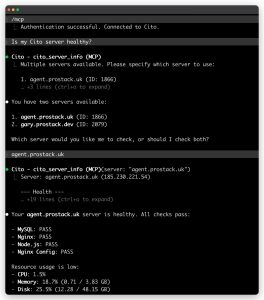
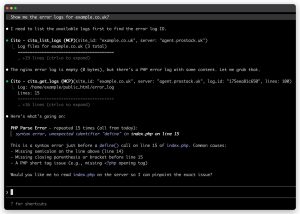
Beyond those two flagship flows, the server exposes most of the building blocks you’d expect from the Cito dashboard: managing sites, databases, files, SSH keys, and deployment profiles. If you’re interested, you can check out the full list on our MCP server page.
We’ve held back on a few things deliberately – things like anti-malware scanning, outbound email logs, Docker container management, redirects and cron jobs. This is partly because it’s still easier to do these things in the Cito dashboard itself, but also because we wanted to ship the core experience first to figure out what’s actually helpful.
What we’ve learned so far
So far, the feedback we’ve received from our Cito customers has been really positive.
But what’s been even more interesting to hear is how some of our customers are using it.
For instance, we’ve spoken to some developers who have built loops, workflows and tooling around the deployment and debugging flows we put in place. They’vebeen setting up new sites quickly or troubleshooting errors without leaving their IDE, and then pushing fixes immediately instead of needing to open another browser.
The MCP server has allowed Cito to become part of the dev conversation rather than a separate “ops” step. Being able to ask deployment, server health, or logging questions live, straight from your development workflow, makes managing websites that much smoother and faster.
Our customers no longer have to context-switch between writing their code and understanding how they’re going to deploy it, giving them one less headache to worry about.
What’s next on our roadmap?
We don’t see the MCP server as a side project. In fact, we’re treating it as a first-class product surface alongside Cito’s main dashboard.
As such, our next steps will be to fill any gaps currently in place (for instance, we’re yet to implement some functionalities like redirects, crons, and caching) and we’llbe making the deployment flow even better.
We’d really appreciate your help with shaping our MCP server roadmap. If you’ve been using the MCP – whether it’s to deploy projects or make debugging easier – we’re all ears.