In order to manage Email Routing for your domain from your WHM interface follow the steps given below.
Step 1
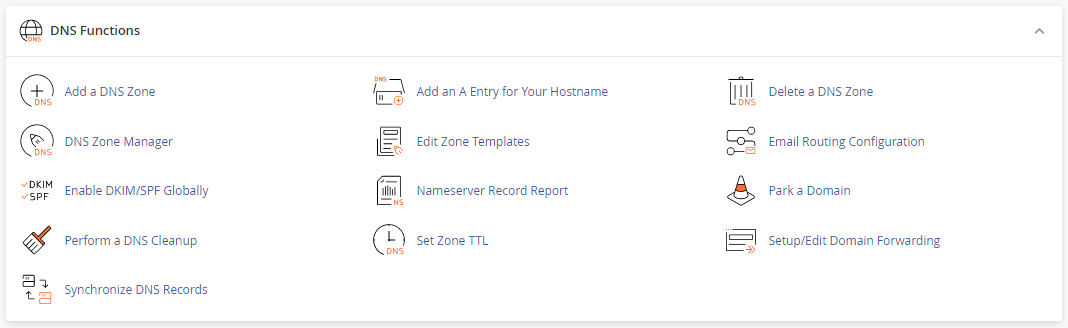
Log into your WHM account and search for DNS Functions.
Step 2
Click on the icon Email Routing Configuration. Select the domain for which you want to edit the MX entry and click Edit.

Step 3
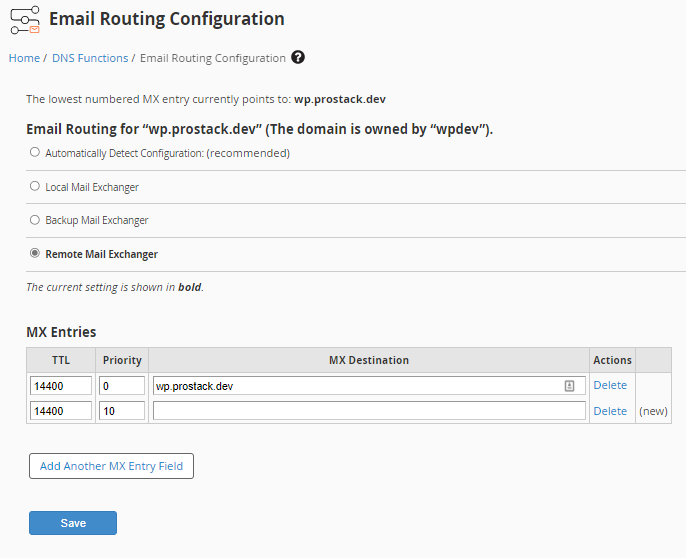
Enter the required routing configuration in the MX Entries section, and click Save. The selection depends on the MX records set for the domain:
- Local Mail Exchanger : When the domain's MX record points to the hosting server itself.
- Remote Mail Exchanger : When the domain's MX record points to remote servers other than the hosting server, for eg: Gsuite, Outlook 365 etc.
Need further assistance?
For more in-depth information on managing MX entries, take a look at cPanel's documentation:
[Edit MX Entry | cPanel & WHM Documentation]
If you require further assistance please contact the ProStack team and we can help get this resolved for you! [Get in touch today!]